

40% less time spent filling in documents
PTO Online
PTO automation without complex implementation
Reduce the time spent preparing documentation by 40% and cut errors by 30%.

AI support
'%3e%3cpath%20d='M31.8999%2017.8056L33.4569%2014.3889M33.4569%2014.3889L38.6499%203L43.8429%2014.3889M33.4569%2014.3889H43.8429M45.3999%2017.8056L43.8429%2014.3889M25.1499%2018.9444H18.3999V3L0.399902%2028.0556H13.8999V44L27.3999%2025.2083'%20stroke='%233448F0'%20stroke-width='2'%20stroke-linecap='round'%20stroke-linejoin='round'/%3e%3c/g%3e%3cdefs%3e%3cclipPath%20id='clip0_1_3979'%3e%3crect%20width='47'%20height='47'%20fill='white'/%3e%3c/clipPath%3e%3c/defs%3e%3c/svg%3e)
All documentation
in one workspace

Implementation in 2 days, without cumbersome systems

Fast 24/7 technical support
and software training
PTO Online is a service for construction contractors and subcontractors

For directors and executives
Control over general contractors and contractors.

For project managers
Task control and team management.

For site supervisors
and foremen
Convenient real-time data entry.
For PTO
engineers
Automation of document completion and routine tasks.
Listed in the Russian Software Registry
Registration number 2024684221
Skolkovo resident
Since 2025
Software capabilities
Explore the service capabilities in a short video.

Viewing time: 5 min 45 sec.
PTO Online: Digital PTO
A cloud platform for as-built documentation on a construction project: projects, the as-built documentation library, logs, estimates, and analytics, all in one workspace.
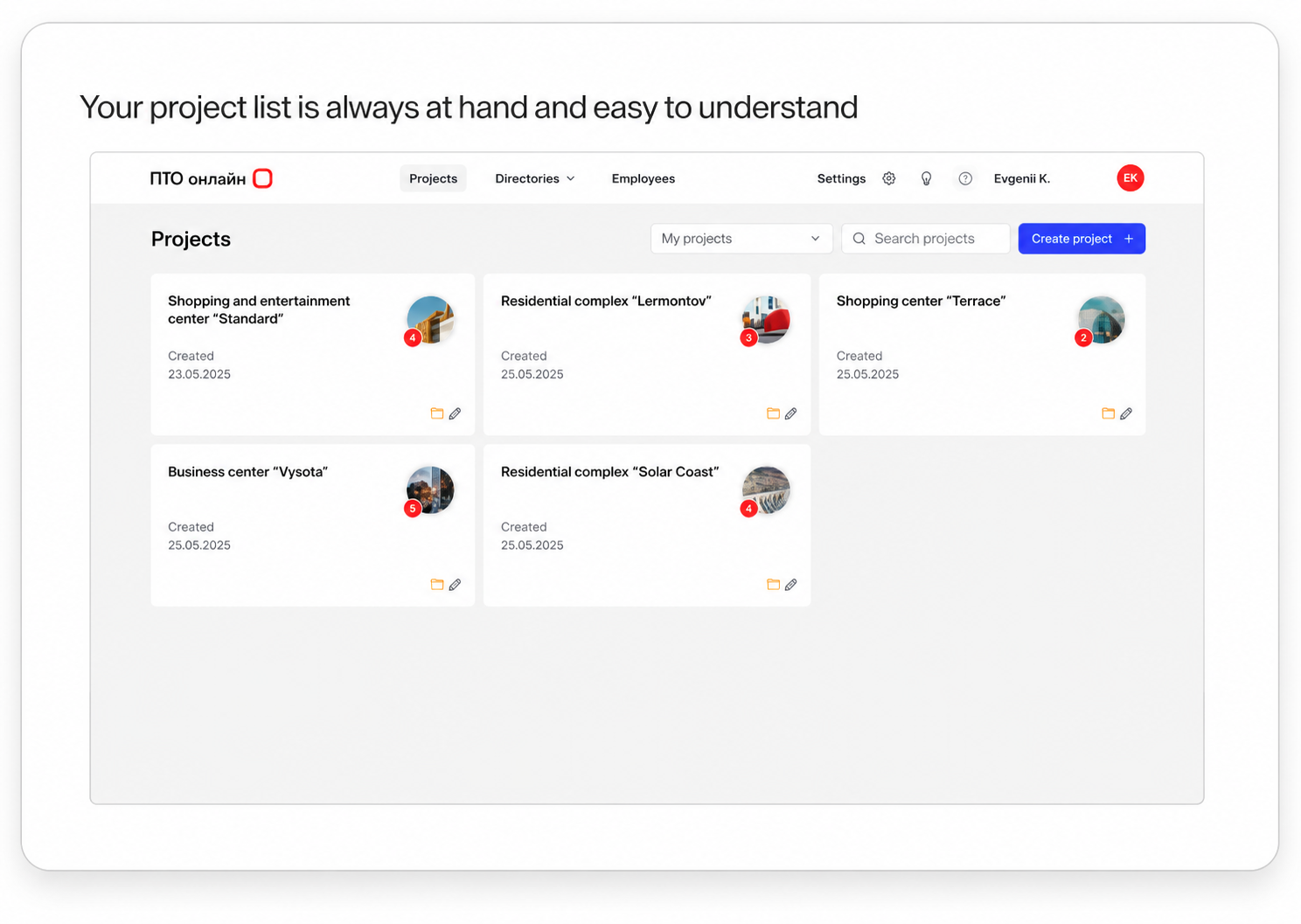
Projects and construction sites
Create projects and configure participant details, log forms, and contractual parameters. The project team and roles define access and responsibilities.
As-built documentation library and templates
A single as-built documentation library by project and document code: create documents from templates or add ready-made files. Add comments and export to Word/Excel directly from the document card.
Form builder and registers
Create your own certificate and log templates: fields, variables, and print-ready DOCX/Excel forms. Group documents into registers and monitor package readiness.
Automatic document completion
Automatically populate details from reference data and recognize scans/certificates. Inserting work items from statements and voice input for long texts speed up document preparation.
Electronic logs
Electronic general construction logs and incoming inspection records using selected forms. Entries are linked to documents; change history and Word/Excel export are available.
Estimates
Manage project estimates in one digital workspace: keep work items, quantities, and calculations up to date.
Statuses, deadlines, and comments
Document statuses and deadlines by document code help you track progress and overdue items. Comments and discussions are recorded in document and register comments.
Analytics
The completeness control screen shows readiness by document code and register, status counters, and changes over time. Registers assemble document packages for review and submission.
KS-2, KS-3, and KS-6a forms
Prepare completed-work certificates and cost statements from project data to approve closing documents faster.
Work statements
Record work types and quantities in statements, then use the same source data in documents and estimates.
Materials
Track materials on site and link them to work, documents, and supporting certificates.
Create an as-built documentation register with AI
Ask AI to generate an as-built documentation register from project data. Review the completed register before sending it to the client, without compiling it manually.
As-built documentation deficiency matrix
Monitor missing documents by code and work stage, so you can close gaps in the as-built documentation package on time.
As-built drawing editor inside the software
Edit as-built drawings directly in PTO Online without switching between applications. Prepare drawings for inclusion in your as-built documentation package.

Viewing time: 5 min 45 sec.
Watch a detailed video about every feature
Advanced AI agent in PTO Online
Upload images and text through the AI agent
Send project images and text directly in your conversation with the agent. Attach materials to your request so the agent can use them when carrying out the task.
Receive notifications about project changes and incoming documents
Learn about incoming documents and project changes through notifications. Managers do not need to open the software each time to check for new activity.
Generate an AOSR with a single request
Specify which works the concealed works inspection report is for and ask the agent to generate it. Review the prepared AOSR before submitting it for approval.
Check the status of as-built documentation preparation
Ask the agent how project documentation preparation and completed work submission are progressing. Use the answers to discuss the current situation with the PTO team and plan your next steps.
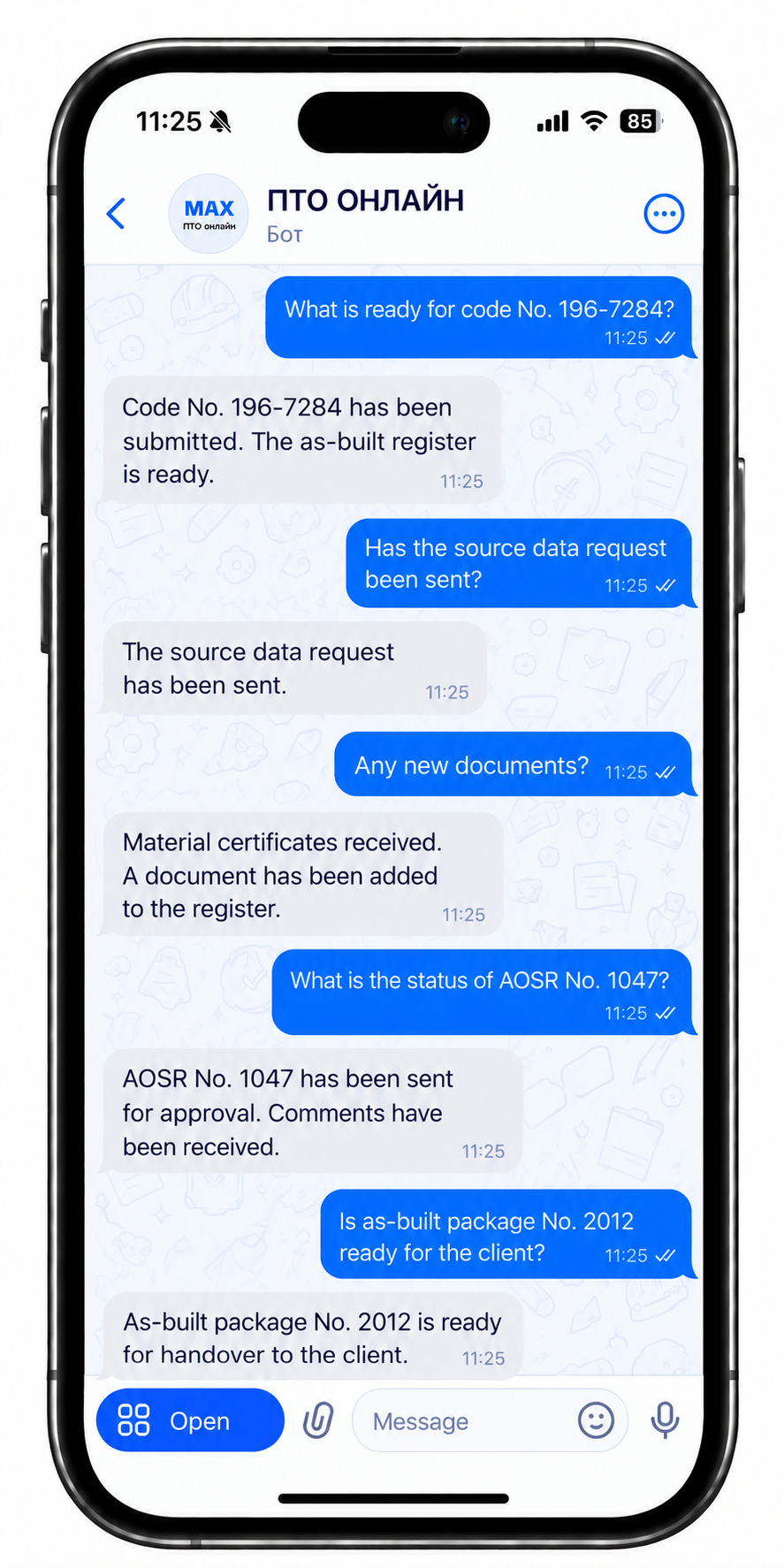
Work with the AI agent in Max from your phone
Access PTO Online through your familiar messenger: ask the agent questions, receive project data and notifications when your work computer is not at hand.
Try the AI agent in action
Register with PTO Online to explore the AI agent.
Chat with the AI agent in MAX
Full real-time control of as-built documentation
Powered by AI

Single project dashboard
Documents, logs, tasks, and statuses in one window: the full picture without switching between folders and services.
Online statuses and deadlines
You can immediately see the stages “not started / in progress / complete” and approaching deadlines; overdue items do not get lost in correspondence.
Links between logs and certificates
General construction log entries and certificates are linked to documents: less manual reconciliation and data duplication across projects.
Completeness before submission
Summary by document code and register: what is ready and what is missing before the package is sent to the client or archive.
Contextual comments
Comments on a specific document or register: assignee, deadline, and discussion history without losing context.
Who changed what
History of key fields and actions: transparency for the PTO, contractors, and approving parties.
Role-based access
The project team sees areas of responsibility; organization data is isolated from other projects.
AI and automation
Recognition, reference-data insertion, and suggestions reduce manual data entry and routine errors.
Task board and priorities
Project-based Kanban: statuses, deadlines, and links to registers, with work control in one place.
Cloud access without installation
Work in a browser; the team always has current data online whenever there is network access, with no software deployment required.
Electronic document workflow
Exchange documentation directly in the software: sign certificates with an electronic signature and send them to counterparties without switching windows.
Working with estimates
Upload estimates to the service: it automatically extracts work types, quantities, and units of measure, and immediately fills in statements.
Source data requests
Send requests for information directly from the service, both to registered contractors and to external email addresses.
Start using it now

You are already paying for manual work
Up to 40% of PTO engineers’ time is spent filling in and rechecking documents. This time is paid for from the budget and lost every day.

Lost resources
Every day without digital PTO means lost time, money, and control.

Errors in as-built documentation cost more than implementing the service
Returned documentation, rework, missed deadlines, and penalties are direct financial losses that can be prevented.

More projects without automation means more problems
The more projects you have, the greater the workload on the PTO. Without a digital system, every new project increases chaos rather than profit.
How PTO Online differs
from typical solutions
| PTO Online | Application + web server | Application + own server | |
|---|---|---|---|
| Functionality | |||
| Automatic generation of as-built documentation | ✓ | Partly | Partly |
| Document template builder | ✓ | Partly | ✕ |
| Automatic document completion using project data | ✓ | ✓ | ✓ |
| Electronic maintenance of the general construction log / specialized logs | ✓ | ✓ | ✓ |
| As-built documentation template library | ✓ | ✓ | ✓ |
| Kanban task control | ✓ | ✕ | ✕ |
| As-built documentation status control | ✓ | Partly | ✓ |
| Comment management | ✓ | Partly | ✓ |
| As-built documentation completeness control before submission | ✓ | ✓ | Partly |
| Implementation and usability | |||
| Cloud solution (no server) | ✓ | Partly | ✕ |
| Fast start without lengthy implementation | ✓ | ✕ | ✕ |
| No complex training required | ✓ | ✕ | ✕ |
| Launch in 1 day | ✓ | Partly | ✕ |
| Simple interface | ✓ | Partly | Partly |
| Browser-based operation | ✓ | Partly | ✓ |
| No IT specialist required | ✓ | Partly | ✕ |
| Economics | |||
| Implementation cost | Low | High | High |
| Separate charge for custom development | No / minimal | Often yes | Often yes |
| Total cost of ownership (TCO) | Low | High | High |
| PTO time savings | High | Medium | Medium |
| Reduction in as-built documentation workload | ✓ | ✓ | ✓ |
| Control and management | |||
| Task deadline control | ✓ | Partly | ✓ |
| Overdue item control | ✓ | Partly | ✓ |
| Assignee control | ✓ | Partly | ✓ |
| Change history | ✓ | Partly | ✓ |
| Access-rights separation | ✓ | Partly | ✓ |
| Transparency of project statuses | ✓ | Partly | ✓ |
Try it now
A simple way to get started with PTO Online

Register and upload documents
1

2
Scan data using AI

Automate document completion and verification
3

Export completed documents in the required format
4

Use the library of
templates and samples
5
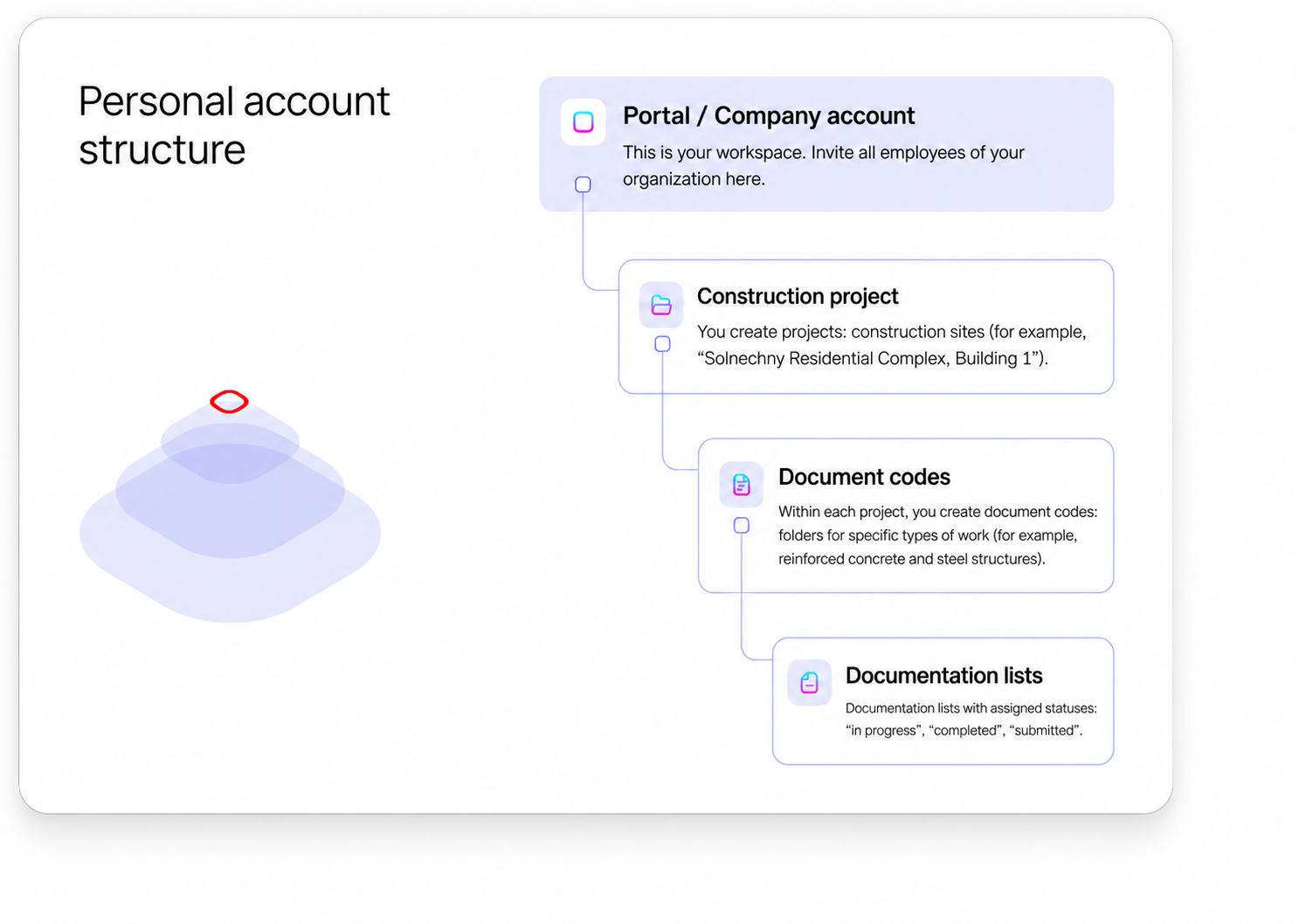
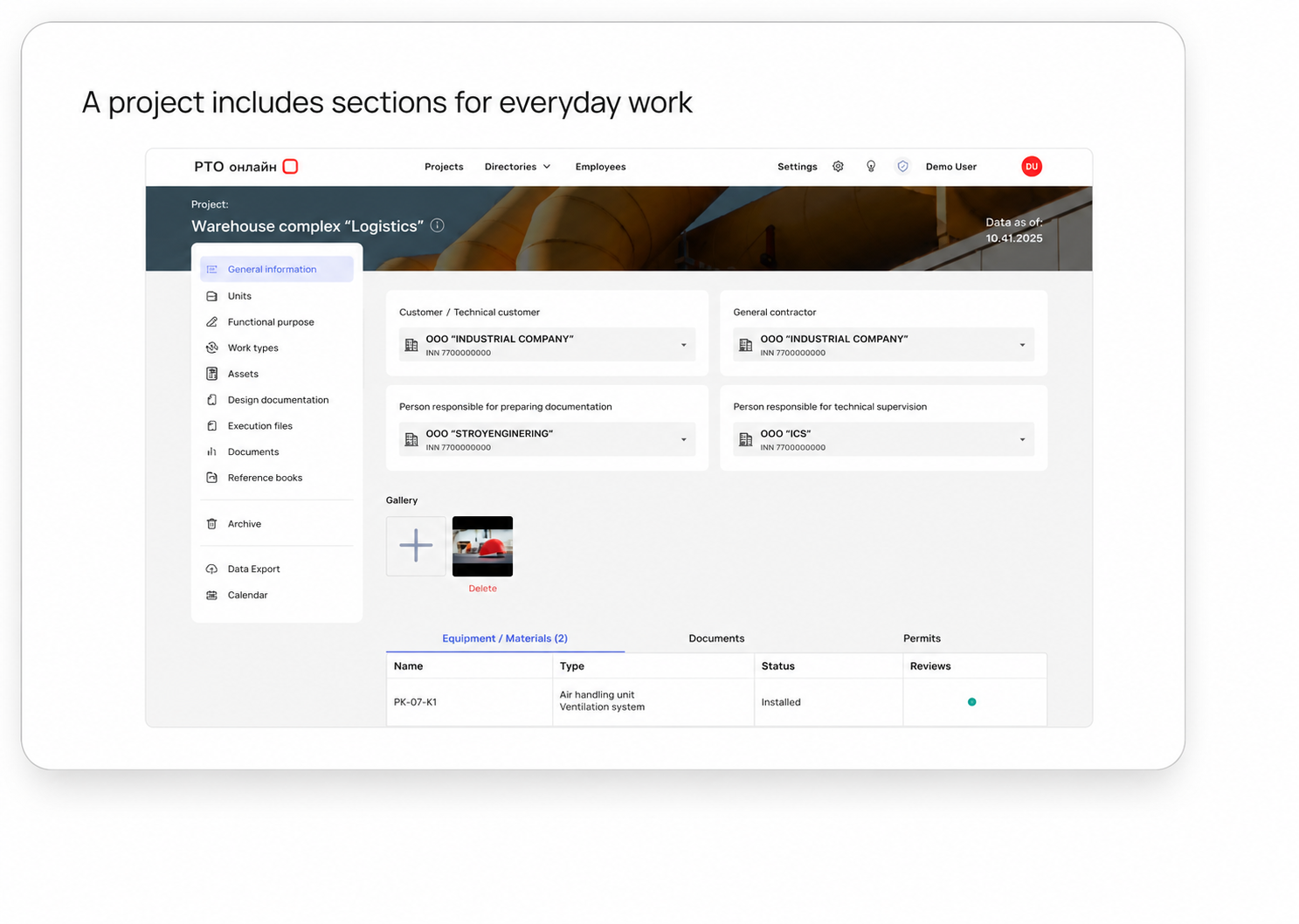
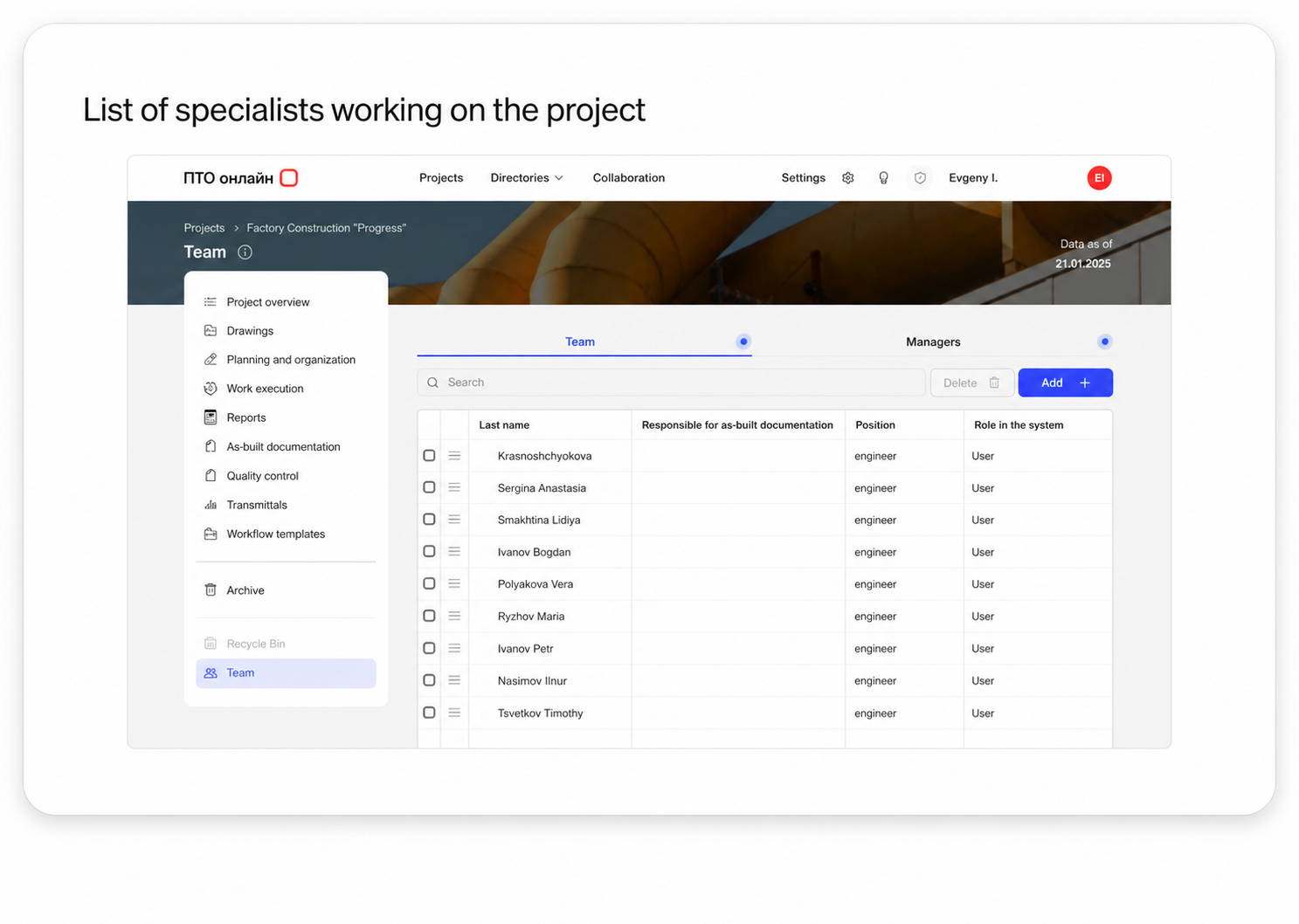
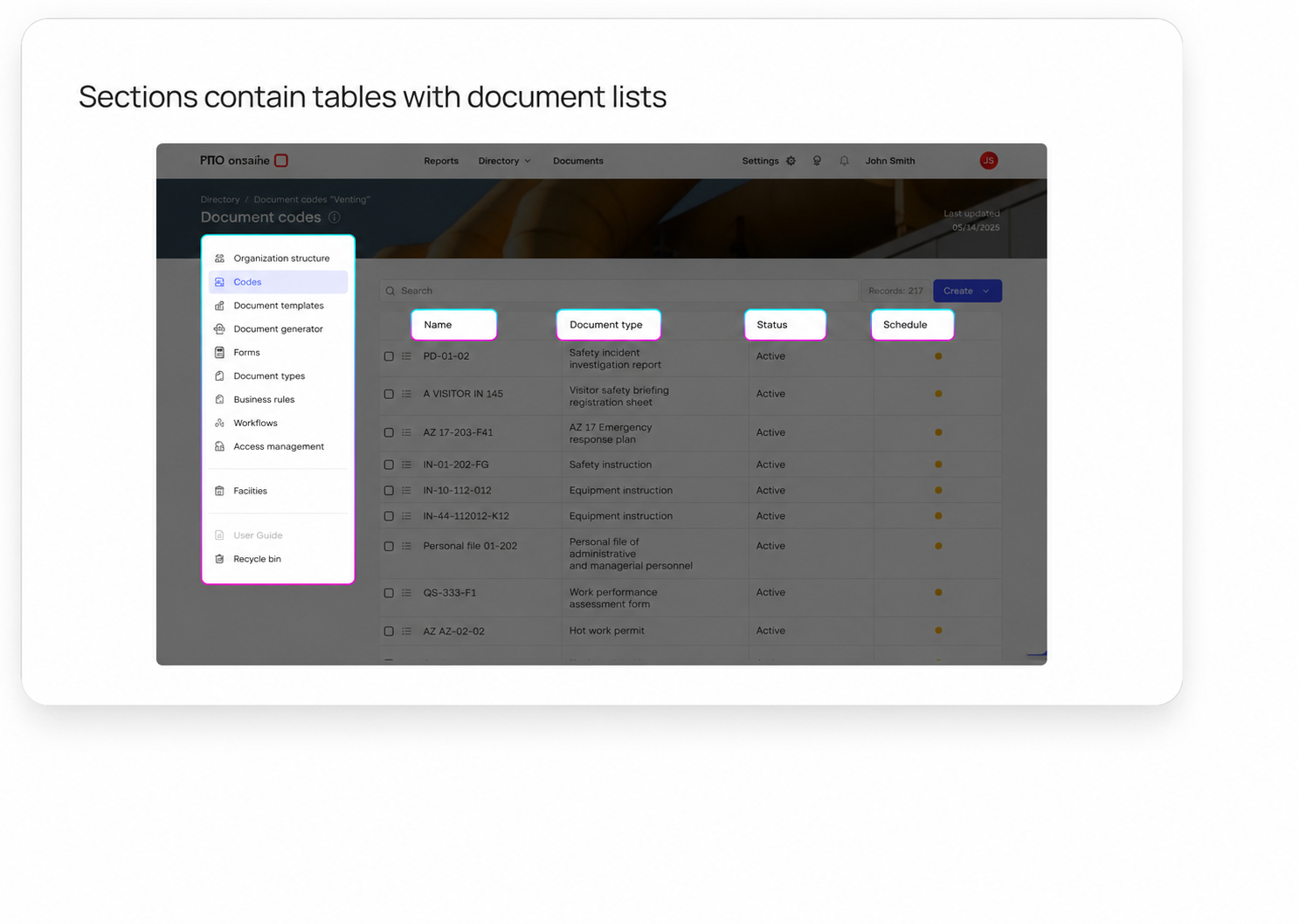
Personal account structure
An intuitive interface with clear navigation elements for quick onboarding.
Reduce document preparation time by 40% and cut errors by 30%
Questions and answers
Support 24/7
Why is your software better than other similar products on the market?

Our software is a neural network that helps create as-built documentation. It offers an intuitive interface, high performance, and unique features that adapt to the user’s needs.
What benefits will I get from using your software?
You can significantly reduce the time spent on routine tasks through process automation. In addition, our software improves accuracy, minimizes errors, and lets you focus on strategically important tasks, ultimately increasing your productivity.
How does your software help save resources?
Our software optimizes resource use through neural-network-assisted process automation, lower manual-labor costs, and fewer errors.
Can the software be adapted to my specific tasks?
Yes, our software can be easily configured to suit individual needs. We offer flexible solutions that can be adapted to the specifics of your work and provide consultations for optimal configuration.
How does artificial intelligence in your software simplify document work?
AI in our software can process large volumes of documents, such as equipment passports, automatically extract data, and complete forms. This not only speeds up work but also minimizes errors. During the presentation, we will show how AI processes in seconds documents that previously required hours of manual work.
How is your software different from manual document completion or using Excel?
Our software fully automates processes that require manual data entry and complex macro setup in Excel. You no longer need to spend time building file networks or risk errors caused by the human factor. All data is centralized, and processes are simplified to just a few clicks. This saves time and reduces the likelihood of errors.
Software installation
The "Online PTO" application is a web service; no installation or removal is required on the user’s side. A web browser is required to access the system. The detailed procedure is described in the installation instructions.
Using the software
Detailed instructions for using the “PTO Online” software are available in the portal guide and video lessons:
